Tuesday, July 15, 2025

Komplete S61 MK2 no aftertouch in Reason

 Here's a weird one! Reason is great to check aftertouch functionality, because NN-XT let's you see aftertouch on the 3rd wheel at the top!

My komplete keyboard S61 MK2 was showing no aftertouch, so I first:

Ran reason as a rack plug in in Komplete Kontrol and voila! Aftertouch

then I deleted the komplete keyboard as a control surface in Reason Stand alone, and let it run as just a keyboard and voila! Aftertouch again!

There isn't a mapping for the S61 MK2, and I didn't find one that works.


Wednesday, December 28, 2022

Remove Password Protection or edit Password with WD Unlocker

 Here's the trick:

Open WD Discovery!

From there, from the drive you are interested in affecting, click the setting icon (gear) and choose remove password or set password! So easy!

Good luck!

d

Tuesday, February 23, 2021

How do I access files from MyCloud Drive from a Windows PC?

 Yes,

WD ended support of WD sync. I have been trying unsuccessfully to figure out the new way of accessing my files. I was shocked to find out an easy way! And almost intuitive! Obviously if it was intuitive I would have found it long ago.

I simply go to Network, which I can find in Windows explorer under Desktop, and the drive appears under Storage. I have always double-clicked this and it opens the almost useless webpage, where it tells me all sorts of things about the drive, but gives me no way to access the damn thing. Sound familiar?

Then I RIGHT-CLICK the icon, and choose open! That worked!!

I don't know if there are permissions and passwords that need to be entered, maybe having once or very recently accessed the drive on the web meant my permissions were already in the system, but what happened when I clicked open is that it opened as a network drive in a windows explorer window! Eureka!

Good luck!

Friday, October 23, 2020

Finale cuts short my audio file!

Cause; There are different possibilities. This solution addresses the following unexpected cause: An MP3 or a WAV or a WMA even can be recorded at different sample rates. CDs are recorded at 44.1kHz, but an audio file can be recorded at different rates. Playback equipment can often transparently sort all this out, but doesn't always. Finale 2011b demands to work in 44.1kHz, but will load a file at 48kHz, and play it back at 44.1 without complaining! But this means the file has 48/44.1 or 9% more samples than can fit in the time finale thinks it should take! (The actual math is 48/44.1-1) So finale is playing the file slower. Imagine the first second contains 48,000 samples (which it does), but finale plays only 44,100 of those samples in the first second, so that when the next second comes, finale hasn't finished playing the first second! Finale still has 9% of the 1st second to play. Finale is behind, and when the entire length of the file has gone by, finale has not played the whole file, and it seems like the file has been cut short, which it has, even though all of its allotted time has gone by. At 44.1 the file will take 9% longer to finish.

Solution: Fortunately you do not have to understand any of that to solve this problem. But you need to burn an MP3 with software that allows you to specify a sample rate. Mine, the beautiful Cakewalk Audio Creator, which used to be Cakewalk Pyro, has an Auto setting for sample rate, but you can choose the sample rate instead. iTunes is a free program which burns MP3's and also allows you to choose the sample rate by choosing custom. I simply made a new version that was 44.1 and saved it to a folder called Finale MP3s 44.1kHz. Loaded that file instead of the 48kHz one and voila! The file played till the end!

Wednesday, February 19, 2020

How do I change my password in Windows 10?

Solution to this is a little weird.
  1.  click the magnifying glass to search.
  2.  type control panel in the search window
  3.  Choose User Account, then 
  4.  Choose User Account; then here's the weird part;
  5.  Choose Manage Another Account
  6.  Choose your account; 
  7.  Now choose Change the password, then everything goes as you probably expect it would.
Good luck!

Saturday, April 13, 2019

Problem: In Akai VIP, controllers not behaving corectly, eg. smooth knob turn causing jump in value

Solution: click midi icon:

so it turns red:

Left side shows midi mapping for your controller; bottom of that list shows mode - should be knob for knobs and some sliders, full range for, maybe mod wheels, etc.

Happy controlling!

Problem: Korg nano device not showing up as input in Korg Control Editor

Solution: Go to CONFIGURE KORG USB MIDI DRIVER (this should be in your start menu under KORG) and make sure MIDI IN dropbox shows BOTH

Happy editing!

Problem: How do I change device in Akai VIP?

Solution: Click the midi icon:
Midi Icon
so that it turns red:
Midi icon red
then on left side under midi mapping, click down arrow to choose a new mapping!

Happy controlling!


Tuesday, April 3, 2018

Problem: Zinio (the magazine reading app) not showing my magazine - worse, I see the magazine as it's loading, then it disappears!

Solution: The magazine was accidentally archived! Just choose Filter By... and select archived, then you'll see it to be able to un-archive it.

Good luck!

Wednesday, May 31, 2017

Some notes on my keyboard not sounding in Cakewalk Sonar

So, I had this problem. Seemed to have no explanation. Finally solved it. If you have the problem for the same reason, this solution may work.

Problem:

For me, when I was controlling a keyboard sound with my 88 keys, I heard nothing on notes A7, and around B7 to F8. It occurred with every soft synth I inserted, and showed no midi activity on the midi channel for these notes. To confirm the keyboard wasn't faulty, I tried in Pro Tools with the same soft synths, and all the notes worked perfectly! Then I noticed that in the piano roll view, the notes that showed no midi activity still highlighted when I played them! This was the first evidence I saw that Sonar was indeed receiving midi information when I pressed those keys.

I'll discuss the steps I took, but feel free to simply skip to the solution below.

Troubleshooting: I felt certain that the problem was that Sonar was intercepting these keys for some controller function, so I checked in the Preferences-Midi-Control Surfaces tab, and indeed, some currently disconnected hardware was listed with the same midi port as the keyboard was using. So I deleted this surface, and fully expected that the problem was solved, and I'd have no further issue. But the problem was unchanged! So I deleted the remaining control surface, which had it's midi port listed as none, just in case. Still no change! So I looked through the Preferences-Customization-Keyboard Shortcuts Tab, selecting MIDI under Type of Keys, but could find no short cut associated with any key.

Turned out the problem did lay in the Control Surfaces tab, and highlights this as an area where Sonar needs improvement. The control surface implementation is in theory, incredible, allowing deep customization and automatic configuration of a new surface, but in practice I've found it often glitchy.
  1. Mapping some knobs seems impossible, as they work as absolute or relative controllers, and the program can't seem to figure them out. In the case of mapping my Samson 49, I resort to learning the control over and over, until, unexplainably, Sonar learns the knob in the correct way. In the case of mapping my AKAI APC Key 25, I just gave up.
  2. My true wish, that I've had for a long time with Sonar, is that they would adopt the protocols that Ableton live uses, perhaps as a selectable Ableton mode, so that I can use the incredible array of inexpensive and versatile controllers for that program. Instead, I can't even map these controllers as ACT controllers, because they communicate in such a different way.
  3. Of course another option would simply be to expand the list of choosable surfaces, but if I could just select an Ableton mode, then it would cover controllers not yet made, plus controllers too trivial to be worth adding to that list.
  4. I wish Sonar would present MCU controllers as ACT controllers so I don't have to try to map them like that. Because I want to get my hands on more than just the faders and pan. I want to tweak EQ (like the real MCU) and soft synths (which the real MCU doesn't do either). Compare it with Reason's implementation of an MCU emulation controller, like the Samson 49. Just selecting MCU allows direct control of every device, by a premapping to all the faders knobs and buttons in the MCU protocol! This is SO FUN! And I don't have to do any surgery, just select MCU as the controller.

Solution: 

  1. Go to Preferences-MIDI-Control Surfaces, and 

  2. Add a new control surface, choosing your keyboard's Midi Port (Actually here the problem immediately disappeared, and those keys worked again.)

  3. Delete the control surface you just added, as the problem should hopefully be gone now.

That should do it! 

Good luck!

How to Change the Timing of Slides in Google Slide

Perhaps Google slide has changed, but it seems this question has out of date answers.

The current way, is go to the file menu, click publish, then either embed OR link gives you the option to choose the time before changing slides.

Good luck!

Wednesday, February 22, 2017

Outlook won't start after changing Password

Foolish computers. I changed my password, opened outlook, expected it to complain and ask me to enter my password, as it has done many times with less justification, but instead it just crashes. Persistently. I open it, it TRIES to connect, and crashes, but we suspect it's only because the password is wrong.

Solution: So simple.
  1. Disconnect from the web. If Outlook doesn't know it doesn't have the password, no crash! Turn off wifi or unplug Ethernet. This step might not be necessary, but if you want to do the next step by opening outlook, then it IS necessary.
  2. I tried changing the password in outlook, but it doesn't seem to give me a way. So remove the account; First find it: One way is opening Outlook, choosing File>Account Settings>Account Settings. Another is through Control Panel>User Accounts>Mail>E-Mail Accounts... Either way, you then select the account and choose remove.Then you can
  3. Reconnect, to the internet, and
  4. Add the account, after following the same procedure in step 2 above, but not selecting any account, just choosing New.
Hope this works for you!

Tuesday, May 31, 2016

Can't transfer my music from iTunes to my iPhone

This happened to me while using Apple Music on my phone. The solution was simple; I should have known, if I choose to have Apple Music then apple would take over!

Solution: I simply went to settings on the phone, scrolled down to select "MUSIC", and turned off the switch next to iCloud Music Library (so that the switch DOES NOT show green). All the downloaded Apple Music is removed. Then sync the phone in iTunes as normal - all non apple music, or all checked (non-apple I guess) music, depending on your settings, will be transferred to the phone. When you're done, re-enable iCloud Music Library, select Merge, and you will be able to download Apple Music tracks as before.

Good luck!

Thursday, April 14, 2016

Monitor has cast / hue / coloured tinge

So, my beautiful Samsung 2333T had this yellowish cast when plugged into my laptop.

It's a VGA or DVI monitor and a laptop with HDMI out, using an HDMI to VGA converter.

Annoying! I finally had enough, and contacted Samsung, chatted with an agent, and he had me try one thing and it solved the problem. More or less he had me unplug it from the computer and plug it back in.

Lately it's been happening again, and my dodgy memory of the last service call had me unplugging, waiting from 0 seconds to 60 seconds, and plugging it back in, to no avail.

So I finally tried to chat again, and while I was waiting to connect with an agent, I read a few things in the FAQ. One of the things I read was on a monitor with a pinkish cast. It talked about the problem being with the cable - change the cable. Focusing on the cable, I came up with something else to try:

Leave the HDMI-VGA converter plugged into the laptop, and only unplug the VGA cable, and re-plug it back in. Or try changing which END of the cable plugs into the laptop and which plugs into the monitor; probably only one end is dodgy, and if this is plugged into the monitor, it won't wiggle around as much, and your problem will be far less frequent.

Problem solved! What a relief! My eyes can relearn the colour white, now.

Good luck!

Sunday, April 5, 2015

Resampling in Sonar Platinum

Resampling here refers to converting the CPU intensive performance, evolution, processing and synth design represented by an instrument track into relatively low CPU-intensity audio that can be chopped up and/or otherwise manipulated.
  1. Resimple (a simple resample)

    I think the quickest and neatest way to do this in the current iteration of Sonar, is to freeze the synth. - simply click the snowflake icon as seen in the picture.
    This is like a bounce in place for synth tracks, taking their load off of the CPU. This doesn't make up for the fact that Sonar's implementation of buses, while elegant, does not allow internal routing of a tracks output to another track. A tracks output can be routed to a bus, but neither a tracks output nor a bus's output can be routed to a track internally. You must use hardware output and input pairs. Which is not elegant.
  2. Resample with Live Input

    You can do the same freeze while performing the mod wheel by right-clicking the snowflake icon, choosing freeze options, and deselecting "fast bounce" and selecting "audible bounce". I don't have a controller with me, so I can't test this out. But I was playing the macro 2 knob in Massive with the mouse instead of the mod wheel. It's not as straightforward to save this mouse performance as the GUI  is hung with a timer while waiting for the freeze operation to complete.
  3. Resample with mouse inputYou can freeze your mouse performance, but for this we need an extra step.
    1. First click the "W" in the GUI to enable automation Write. I've included a shot of this button too.
      Then play and perform the mouse performance - writing the automation to the track.
    2. Now click the snowflake to freeze the track, including the mouse performance.
In all these scenarios, the frozen track can be dragged to another track to make a new track, so that a new performance can be made after "unfreezing" the synth (by pressing the snowflake button again).

Note that, instead of freezing  and unfreezing, you can use bounce to track, selecting Tracks as the Source Category and Your synth (massive here) as the Source. Even using bounce to track, you can deselect fast bounce, select audible bounce and live input, and play in the mod wheel while bouncing. (I think. again, I haven't got a controller with me today, so I can't test this out today!)

good luck!

d

Monday, March 23, 2015

Can't download bonus software from m-audio?

Problem: Bonus software from m-audio, in large 2Gb parts, failing to download, after downloading for 2 hours!

Solution: Try turning off any download managers, and just using the download management that is built into your browser. I was using Download Accelerator Plus, which always helps downloads not to fail. Anyway, I disabled it, and the download proceeded without a hitch!

Good luck!

d

Monday, March 2, 2015

SONAR Platinum - no aftertouch

Problem: In SONAR Platinum, my keyboard should have aftertouch, but I don't hear any effect of it.

Solution: simply make sure SONAR is set to record aftertouch, if it isn't recording it, apparently it won't echo it. This is done from the "Playback and Recording" page of the Preferences dialogue, but remember there are two kinds of Aftertouch, key aftertouch, and channel aftertouch. I leave them both checked, but remember they cause a lot more data to be recorded, so it may be unnecessarily taxing for your system if you are not using them.
Good luck!

d

Sunday, March 1, 2015

Sonar Platinum - Can't hear notes in PRV

Problem: SONAR - I hear and see the notes when I play the keyboard, but not when I click the keys on screen

Solution:
As seen in the picture,
I have a snare track, I've opened the piano roll view for the track, and when I play the keyboard, I can hear the snare and see the D3 key flashing, but when I click D3, I don't hear anything. This was just my mistake. This snare track is just a place for the snare audio to reach the console and be processed. It's an audio track, not a midi track, and not an instrument track, in spite of the icon. Simply create a new midi track below it, send that to the proper synth, in this case session drummer, and open the piano roll view for this new midi track.

good luck!

d

Saturday, February 21, 2015

Sonar Platinum - Can't hear notes I add

Problem - In piano roll view, I can hear when I click the keyboard/note names at the side I hear them, but when I add notes, with velocity positive and showing below, I don't hear the notes I've added.
Workaround: The entered notes are likely not where they appear. Try zooming out vertically to see more notes, then you will see where the notes likely are, and the note names will align themselves with the note grid.

This appears to be a bug, and I won't be able to get clear on it until I can re-create it.

Good luck!

Sunday, February 8, 2015

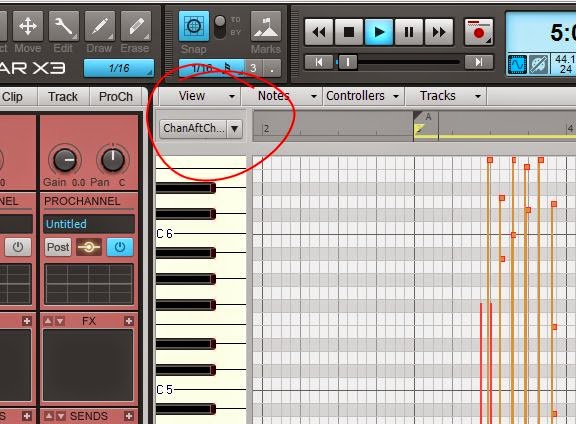
SONAR X3 - Trying to draw notes, but only drawing aftertouch

Problem: I'm in piano roll view, trying to draw a note, but I can only draw aftertouch events.

Solution: Find the edit filter:
And chose notes.

Good Luck!

d