Thursday, April 14, 2016

Monitor has cast / hue / coloured tinge

So, my beautiful Samsung 2333T had this yellowish cast when plugged into my laptop.

It's a VGA or DVI monitor and a laptop with HDMI out, using an HDMI to VGA converter.

Annoying! I finally had enough, and contacted Samsung, chatted with an agent, and he had me try one thing and it solved the problem. More or less he had me unplug it from the computer and plug it back in.

Lately it's been happening again, and my dodgy memory of the last service call had me unplugging, waiting from 0 seconds to 60 seconds, and plugging it back in, to no avail.

So I finally tried to chat again, and while I was waiting to connect with an agent, I read a few things in the FAQ. One of the things I read was on a monitor with a pinkish cast. It talked about the problem being with the cable - change the cable. Focusing on the cable, I came up with something else to try:

Leave the HDMI-VGA converter plugged into the laptop, and only unplug the VGA cable, and re-plug it back in. Or try changing which END of the cable plugs into the laptop and which plugs into the monitor; probably only one end is dodgy, and if this is plugged into the monitor, it won't wiggle around as much, and your problem will be far less frequent.

Problem solved! What a relief! My eyes can relearn the colour white, now.

Good luck!

Sunday, April 5, 2015

Resampling in Sonar Platinum

Resampling here refers to converting the CPU intensive performance, evolution, processing and synth design represented by an instrument track into relatively low CPU-intensity audio that can be chopped up and/or otherwise manipulated.
  1. Resimple (a simple resample)

    I think the quickest and neatest way to do this in the current iteration of Sonar, is to freeze the synth. - simply click the snowflake icon as seen in the picture.
    This is like a bounce in place for synth tracks, taking their load off of the CPU. This doesn't make up for the fact that Sonar's implementation of buses, while elegant, does not allow internal routing of a tracks output to another track. A tracks output can be routed to a bus, but neither a tracks output nor a bus's output can be routed to a track internally. You must use hardware output and input pairs. Which is not elegant.
  2. Resample with Live Input

    You can do the same freeze while performing the mod wheel by right-clicking the snowflake icon, choosing freeze options, and deselecting "fast bounce" and selecting "audible bounce". I don't have a controller with me, so I can't test this out. But I was playing the macro 2 knob in Massive with the mouse instead of the mod wheel. It's not as straightforward to save this mouse performance as the GUI  is hung with a timer while waiting for the freeze operation to complete.
  3. Resample with mouse inputYou can freeze your mouse performance, but for this we need an extra step.
    1. First click the "W" in the GUI to enable automation Write. I've included a shot of this button too.
      Then play and perform the mouse performance - writing the automation to the track.
    2. Now click the snowflake to freeze the track, including the mouse performance.
In all these scenarios, the frozen track can be dragged to another track to make a new track, so that a new performance can be made after "unfreezing" the synth (by pressing the snowflake button again).

Note that, instead of freezing  and unfreezing, you can use bounce to track, selecting Tracks as the Source Category and Your synth (massive here) as the Source. Even using bounce to track, you can deselect fast bounce, select audible bounce and live input, and play in the mod wheel while bouncing. (I think. again, I haven't got a controller with me today, so I can't test this out today!)

good luck!

d

Monday, March 23, 2015

Can't download bonus software from m-audio?

Problem: Bonus software from m-audio, in large 2Gb parts, failing to download, after downloading for 2 hours!

Solution: Try turning off any download managers, and just using the download management that is built into your browser. I was using Download Accelerator Plus, which always helps downloads not to fail. Anyway, I disabled it, and the download proceeded without a hitch!

Good luck!

d

Monday, March 2, 2015

SONAR Platinum - no aftertouch

Problem: In SONAR Platinum, my keyboard should have aftertouch, but I don't hear any effect of it.

Solution: simply make sure SONAR is set to record aftertouch, if it isn't recording it, apparently it won't echo it. This is done from the "Playback and Recording" page of the Preferences dialogue, but remember there are two kinds of Aftertouch, key aftertouch, and channel aftertouch. I leave them both checked, but remember they cause a lot more data to be recorded, so it may be unnecessarily taxing for your system if you are not using them.
Good luck!

d

Sunday, March 1, 2015

Sonar Platinum - Can't hear notes in PRV

Problem: SONAR - I hear and see the notes when I play the keyboard, but not when I click the keys on screen

Solution:
As seen in the picture,
I have a snare track, I've opened the piano roll view for the track, and when I play the keyboard, I can hear the snare and see the D3 key flashing, but when I click D3, I don't hear anything. This was just my mistake. This snare track is just a place for the snare audio to reach the console and be processed. It's an audio track, not a midi track, and not an instrument track, in spite of the icon. Simply create a new midi track below it, send that to the proper synth, in this case session drummer, and open the piano roll view for this new midi track.

good luck!

d

Saturday, February 21, 2015

Sonar Platinum - Can't hear notes I add

Problem - In piano roll view, I can hear when I click the keyboard/note names at the side I hear them, but when I add notes, with velocity positive and showing below, I don't hear the notes I've added.
Workaround: The entered notes are likely not where they appear. Try zooming out vertically to see more notes, then you will see where the notes likely are, and the note names will align themselves with the note grid.

This appears to be a bug, and I won't be able to get clear on it until I can re-create it.

Good luck!

Sunday, February 8, 2015

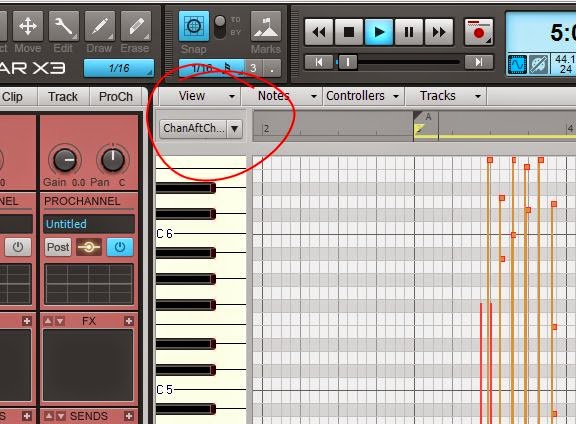
SONAR X3 - Trying to draw notes, but only drawing aftertouch

Problem: I'm in piano roll view, trying to draw a note, but I can only draw aftertouch events.

Solution: Find the edit filter:
And chose notes.

Good Luck!

d